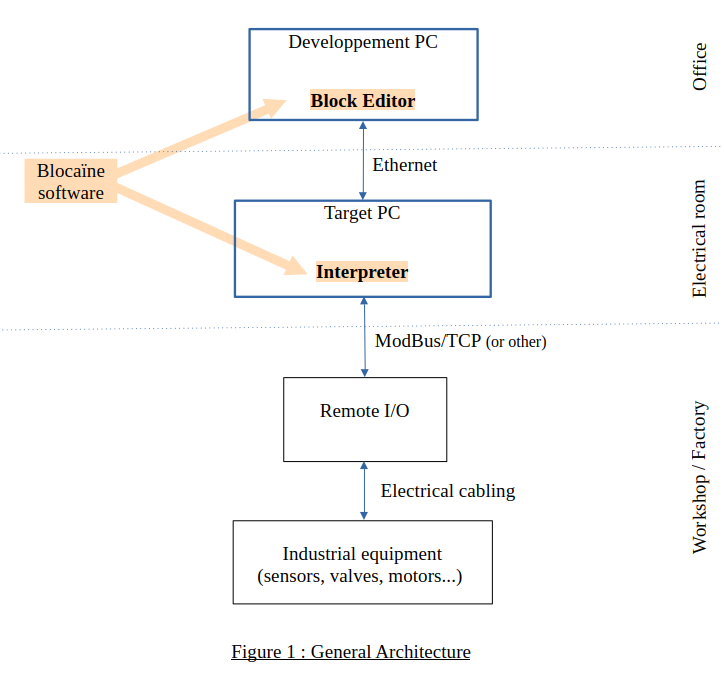
A new version of a program can be loaded on the fly, without stopping the installation.
Editing
- Graphical programming using chained functional blocks
- Block execution order is generated automatically
- Layout is automatic
Validity bit
Each variable natively has a validity bit, which propagates from block to block.
Python
- Dynamic variable typing
- Functional blocks can be written in Python
Debugging
- Target simulator (acting as a PLC)
- Real-time variable visualization
- Variables can be overridden
Connectivity
- A web server, allowing visualization of the target status
- An OPC UA server, enabling interfacing with an HMI/SCADA
- A ModBus client, enabling control of remote I/O
Open source
Blocaïne is royalty-free and open source.
Technical sheet
Advantages
Philosophy
KISS - Keep It Simple, Stupid
Advanced features
"Hot loading", validity bit, dynamic typing...
Cost
Low cost (hardware & software)
License
Free and open source. The code is fully available and modifiable.
Obsolescence
Minimizes obsolescence thanks to long-lasting standards (Python, Ethernet, PC)
Limitations
CPU resources
Not suitable for large CPU-intensive projects — a basic “System” block runs in about 2 µs on a Raspberry Pi 5 (max about 0.5 M blocks/s).
Real time
No “hard” real-time system — latency remains below 1 ms on Raspberry Pi 5.
Library
Some expected “System” blocks may still be missing.
Project progress
The beta version of Blocaïne is available on GitHub. To make installation easier for evaluation purposes, the downloadable version is configured so that:
the Block Editor and the Interpreter run on the same PC, which eliminates any network configuration;
some features are disabled (OPC, GPIO, ModBus/TCP), which eliminates the need to install specific Python modules.
It only takes 3 minutes to download and start using Blocaïne.
After downloading, you simply need to launch the Interpreter and then the Block Editor; the connection between the two is automatic, and you can then begin evaluating Blocaïne.
add additionand logical ANDappend add an element to end of listcablin adds an element to a structurecablout extracts an element from a structureclock clockcomp comparisonconst.pi pi constantdelay rising or falling edge delaydifferential differentialdiv divisiondt task cycle timeedge rising and/or falling edge detectionfilter_FO first-order filtergeti returns element [n]GPIO_DI read GPIO digital inputGPIO_DO write GPIO digital outputGPIO_PWM write GPIO PWM outputhold hold functioninformation returns variable infoinput block inputinput_output access output from another processinsert insert element into listintegrator time-based integratorlen returns number of elementslimit high and low limitsmemory memory (RS flip-flop)minmax minimum and maximummodbus_conn ModBus/TCP connectionmodbus_read ModBus/TCP input readingmodbus_write ModBus/TCP output assignmentmult multiplicationnot logical NOTOPC_node create an OPC UA nodeOPC_read get an OPC UA variableOPC_server configure an OPC UA serverOPC_var create an OPC UA variableOPC_write set an OPC UA variableor logical ORoutput block outputpop removes element from listprevious stored variableprint Python’s print functionputi sets an element in a listrange loop iterationreadbit get a bit in an integerselect selection (if then else)sub subtractiontime system clock readingtype type conversionvalidRead validity bit readingvalidWrite validity bit writingwritebit set a bit in an integer